What follows is a story about my journey into AI driven network automation, and here’s what I hope you’ll get out of it:
- How to use AI well in the context of network automation
- When traditional network automation is a better fit
- Why AI isn’t going to replace you as a domain expert
- What you can do to start your own journey
- Who can help you along the way
If you want to jump straight to what I did, check out these two GitHub repos:
1. System Acceptance Tests for AOS-CX switches, using Robot Framework against the AOS-CX REST API:
github.com/crispyfi/robotframework-aos-cx
2. A complete demo that you can try yourself using GitHub CodeSpaces for free:
github.com/crispyfi/cx-sat-demo
Laziness is the mother of all engineering
I started working on a bunch of projects this year, involving multiple large campus network deployments.
Following a common architecture, most of the design, configuration and testing was repeatable across sites.
Looking at the mountain of repetitive (tedious) work ahead of me – it’s 2026, so you can guess what comes next…
AI can help?
This has been the catch cry of the networking industry at the moment.
In the HPE Networking world, it’s called the Self-Driving Network, and its a great use case for AI, since it involves:
- Crunching lots of data
- Finding patterns and connecting the dots
- Creating actionable insights
Generative AI refresher
It’s important to remember at this point what AI actually does, and what it doesn’t do.
It doesn’t “think” with logic – it’s predicting the best answer based on its training sources. Like predictive text on steroids.
It is also designed to sound confident, but a lot of times it is confidently wrong.

Strengths:
- Generates text that looks similar to what a human would write
- Reads lots of text really fast
- Surprisingly good responses to a wide variety of tasks
Weaknesses
- It might not always “pay attention” to everything in the prompt
- It might not consistently give the same answer
- Everything is a hallucination – but it’s correct surprisingly often
Groundhog Day
If you live in the Professional Services world (like me), most of our time is spent on Day-0 or Day-1 operations.
In this world, everything is about:
- Consistency
- Reliability
- Repeatability
- Auditability
- Running in customer environments
All things that AI is not known for being good at.
Try not
I’m faced with a dilemma: I have a lot of repeatable work, but I can’t trust AI to help.
So now I do what any Padawan does – go and talk to a Jedi Master.
Fortunately for me, there is one in the family – my brother.
He’s a real software developer (you know, the beard, socks & sandals kind). He also happens to have a PhD in Machine Learning and runs training on Python, Git and using Generative AI
The solution to this problem is obvious to him, he’s been saying it for 900 years:
“Python, Git, CI/CD. Once you start down the dark path, forever will it dominate your destiny. Consume you, it will”

Mind the gap
That’s right, traditional network automation – the kind that all the cool DevOps kids are using.
So why are so few network engineers doing it?
For me, this XKCD comic pretty much sums it up:
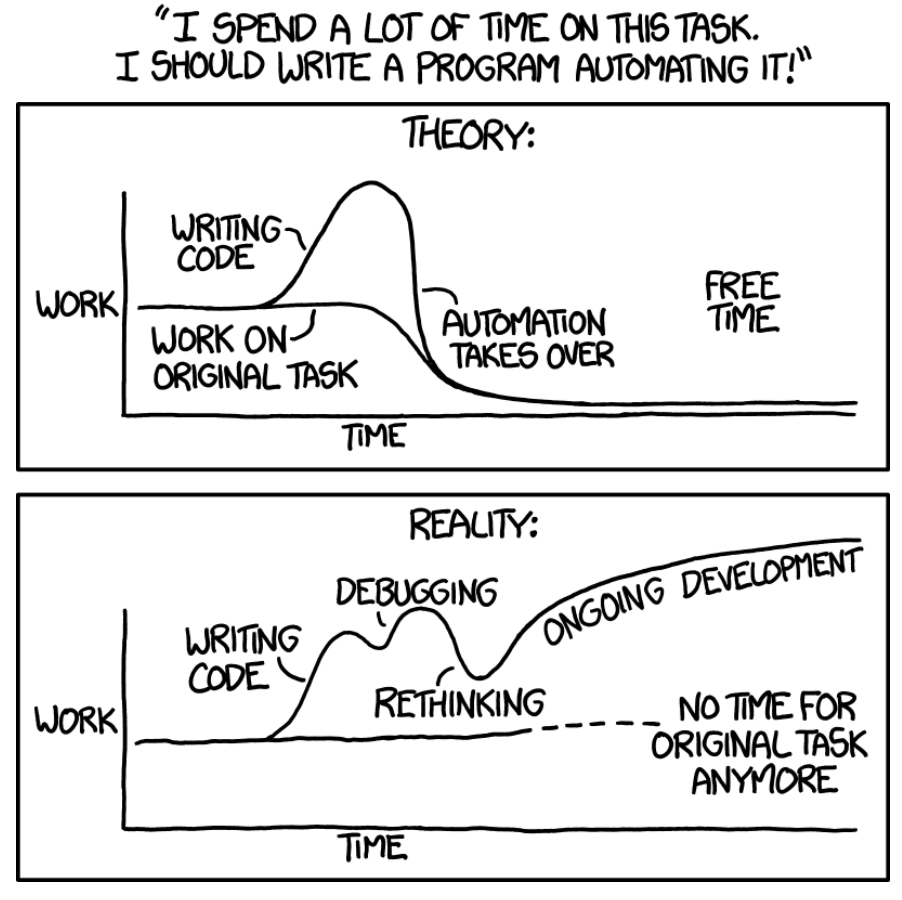
This was my justification for not automating things. I’m sure you can relate.
I’m NOT a software developer and I didn’t study computer science.
I do understand basic programming concepts, for loops, variables, de-coupling, and have written (plagiarised and hacked together) a few scripts over the years.
But this is like having a tourists level understanding of French – enough to have a basic conversation, but no more than that.
Use the force Luke

With the explosion of Generative AI, there is now a ‘force multiplier’ available.
Learning Python is no longer a barrier to automation.
So what did this mean for my projects?
A journey of 1000 miles…
Before starting on my big projects this year, I was inspired by a colleague of mine who was doing API automation for deploying a similar config to multiple sites.
I started playing around in my HPE Networking Central lab to see if I could automate some of the standard configuration I would deploy at a customer, it sort-of worked but it prepared me for what was next.
When I came into the big project environment, I struggled to find standard configs or my teams ‘current’ or ‘best’ way of doing things, so I had to pull all it this together from some existing deployments before deploying my first site.
Fortunately for us, we had a well-defined architecture and set of design guidelines, as well as a clear high-level design.
The first thing I built was a config generator. It was the spiritual successor to an Excel spreadsheet full of VLOOKUP and CONCAT functions, requiring some clever find/replace in NotePad++ before it was finally paste-able in a switch.
I had a free ChatGPT account that I used to write my code, which I’d paste into a text editor, then copy/paste bugs back into the prompt.
Level Up

The free account didn’t cut it for long so I upgraded my plan and started using the VSCode extension, which allowed ChatGPT to read and edit one file at a time. It made a massive difference, and helped me build a few tools:
- Config generator that takes an Excel workbook as input, and renders config files using Jinja templates
- HPE Greenlake device inventory tool that can add & assign devices to an MSP tenant, attach a subscription and assign to a Central pre-provisioning group
- Created Classic Central template groups and uploaded config templates and variables files written by the config generator
The value of these tools was massive, and as a result we got:
- Consistent config across projects
- Our ‘best approach’ as code, with a record of all changes in version control
- Lessons learned are incorporated to eliminate repeating issues
- Minimised risk of human error
- Efficiency: we saved tens of hours per project
- Better job satisfaction – removal of tedious tasks
I also learned A LOT. It was time to go deeper down the rabbit hole.
Je m’appelle Claude

After I saw a demo of Claude Code, everything changed. I immediately signed up for a Pro subscription.
All of the things I had struggled with using ChatGPT were addressed:
- Less suggestions resulting in ‘feature creep’
- A dedicated plan mode
- The ability to work on an entire repo instead of one file at a time
- Better context and session management
It was almost like it was designed to do exactly what I was doing. I guess the hint is in the name 😛
If you don’t know, Claude Code is, in a nutshell it is an agentic coding tool that you can run inside your terminal or IDE.
The fat cat SAT on the mat
Armed with Claude Code, and after a mind-blowingly fast refactor of my first round of tools, it was time to have a crack at the holy grail – Systems Acceptance Testing.
Systems Acceptance Testing or SAT is what happens at the end of the project before User Acceptance Testing. Its about proving that the network meets all of the requirements, and matches all of the specifics in the design.
The current approach was running multiple ‘show’ commands via SSH, pasting the results into a spreadsheet, and eyeballing the output to see if the test case passed. Almost a hundred test cases for between 20-30 switches in one deployment.

Switching was definitely going to give us the best return on investment for automation, so we started with that.
Using the Central API was our first choice, but we quickly discovered it didn’t have anywhere near the coverage we needed for our test cases.
An initial version took a ‘show tech’ output, split it into sections, and put it into a report for human review but we could do better.
APIs
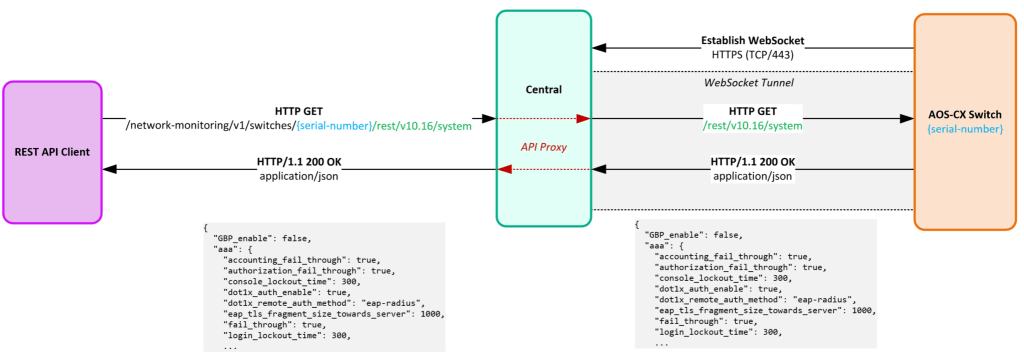
As it turned out, the AOS-CX API had the best API coverage, but it came with the challenge of needing our test runner to be deployed inside the customer environment, which was tightly locked down.
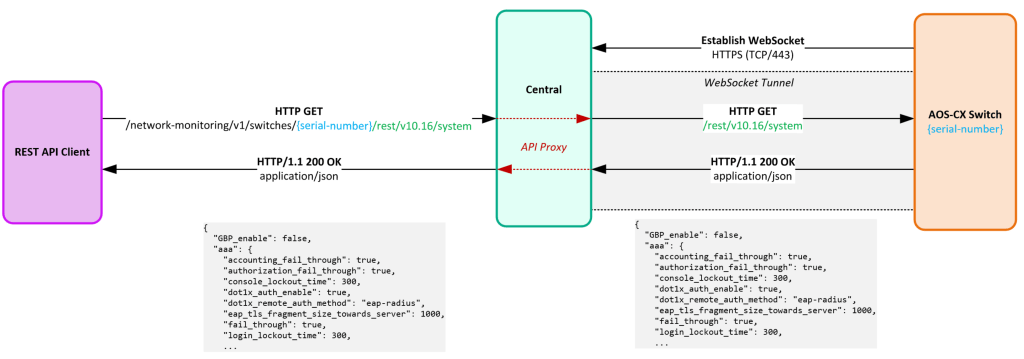
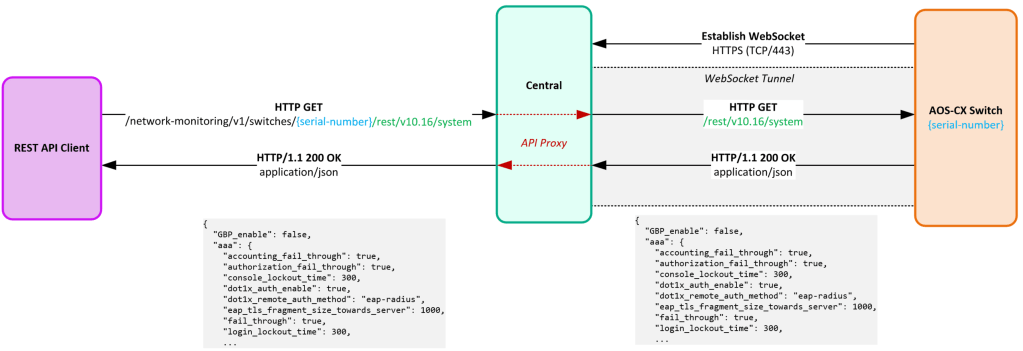
If Central allowed us to query the AOS-CX API for managed devices, it would make our lives a lot easier. See my previous post for a feature request we submitted for this.
I..AM…A…ROBOT
My Jedi Master (brother) suggested using Robot Framework for running our test cases.
It’s Open source, and uses human-readable test cases, with Python libraries on the backend.
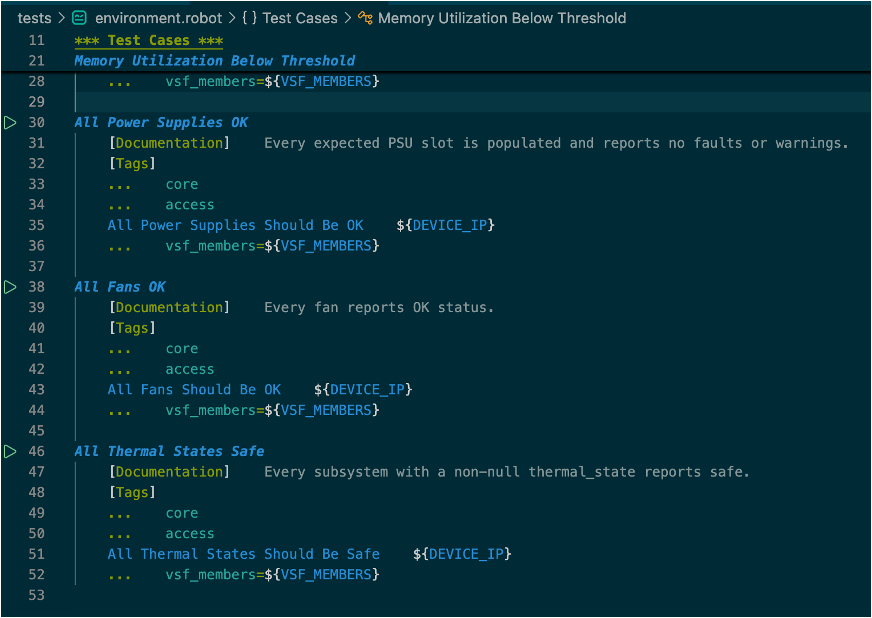
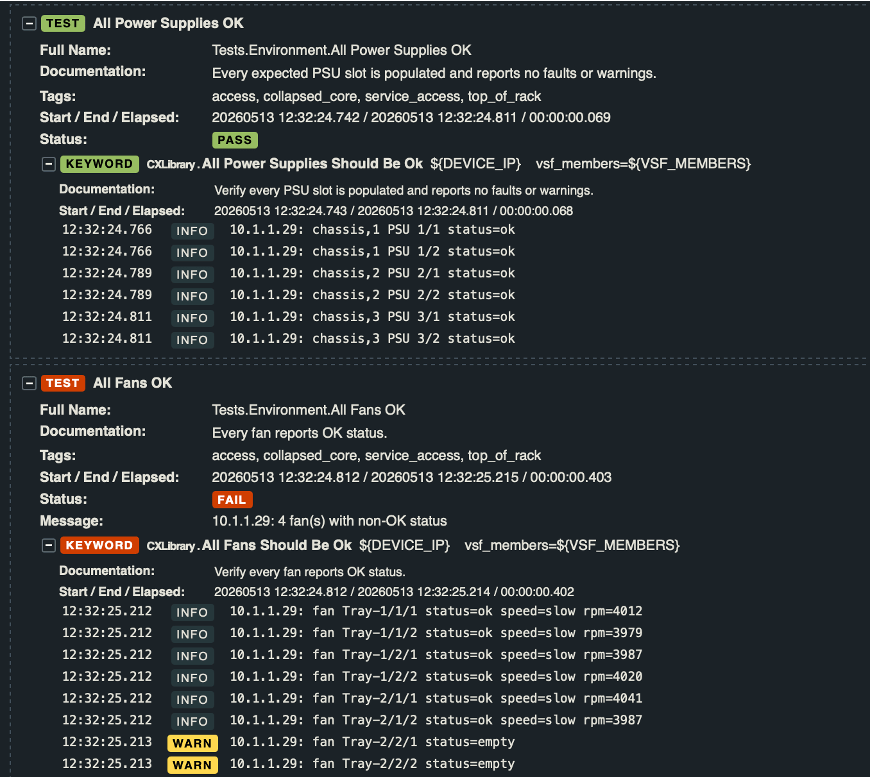
It also had really nice looking HTML-based reporting out of the box.
We would just need to build the test cases and Python code for each test case…anyone know a good Python developer?
AI to the rescue
With Robot Framework (traditional automation) taking care of running the tests in a predictable, auditable way, we figured we could use AI to write the test cases!
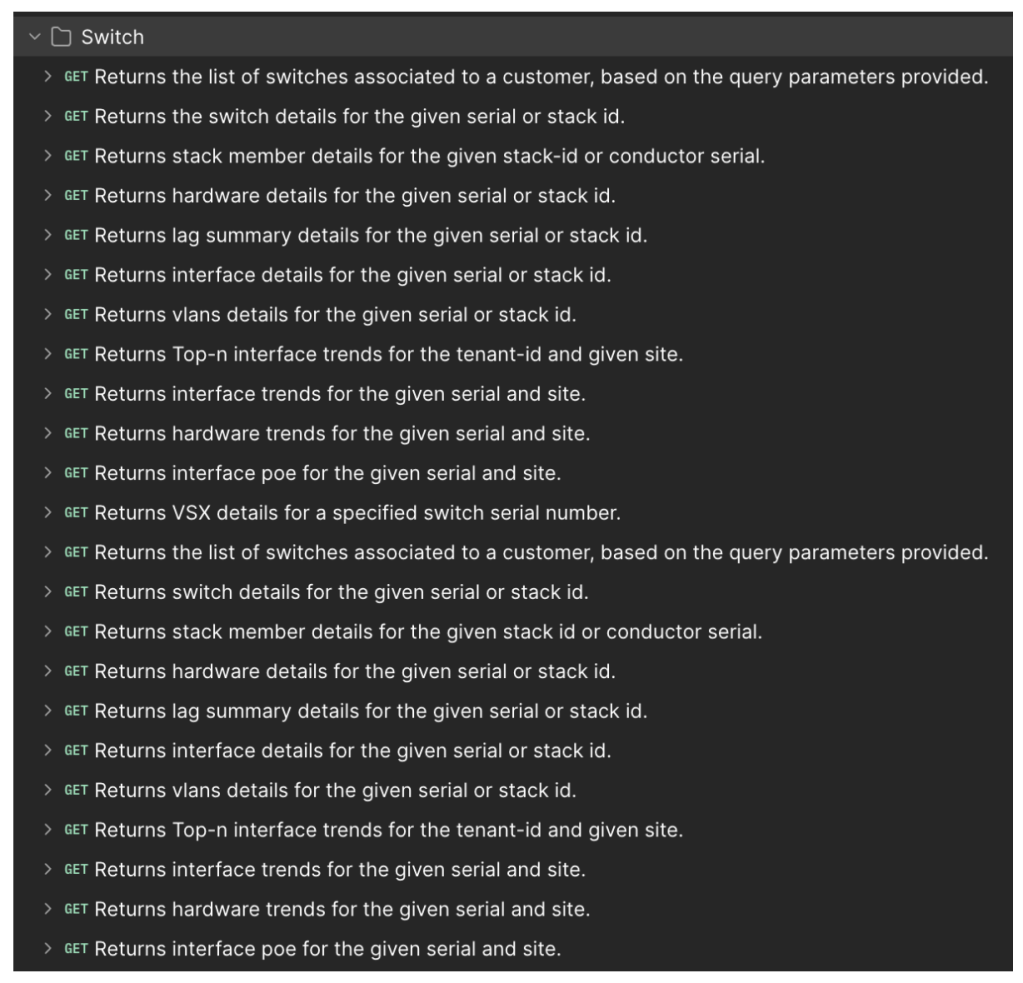
So we took a JSON export of the AOS-CX Postman Collection, de-duplicated it a bit so it would fit inside Claude Code’s context window, and created a skill where it would take a test case described in plain-English, and use a discovery script to query whichever API endpoint looked like the best one.
On paper this sounded great – the perfect way to use AI. I tried it out on a couple of simple examples: Check that the timezone is correct, check that VSX is healthy. It worked brilliantly. So I fed it the whole list of test cases.
That’s when things fell apart. Most of the test cases didn’t work at all.
I even tried querying a bunch of endpoints in advance, sanitising the output to remove customer info, and asking Claude to use that.
All I ended up doing was blowing through my subscription limits at the beginning of the week and my extra usage.

Back to the drawing board
After taking a break for a few days, I took another look at it.
To conserve token limits I put instructions into CLAUDE.md not to read the sample API data, and to split the monolithic Python library into multiple files, to work on one at a time, clearing my session between each.
I took the discovery script I’d given to Claude and started using it myself.
It was actually fun, looking at the output, figuring out exactly which key translated to the item I needed to check in the config. It wasn’t always obvious, but it was a rewarding challenge.
I’m the captain now
And then it dawned on me. I should be doing this part because I’m the domain expert.
AI isn’t as good at figuring this stuff out.
Armed with this new approach I worked through over 100 test cases, then tested them, refined them and re-architected a few times.
The proof is in the pudding
I finally got all of the test cases to pass (at least the ones that should have been passing) and the payoff was immediate, and big.
For an in-flight project, I was quickly able to pickup a number of issues that were able to be resolved before cutover, some requiring reboots. Had I discovered these later, it would have involved planned outages.
Because this was validating design intent vs deployment, it wasn’t something that Central could have alerted on either.
The penny dropped
So now I finally know how CI/CD testing feels, and why Jedi Master Yoda has been drumming on about “Why aren’t you doing this for the networks you build”. The penny dropped.
Here are some other things he said A LOT of times that came in very handy:
Use an AI-friendly IDE
- Not notepad++
- VSCode is a solid choice
Use Version Control
- Setup your own GitHub account
- Create a private repo for your project
- Sync to your laptop
- Commit and push often
Document
- Keep README.md up to date
- If you don’t already, start writing in Markdown!
- Obsidian is a great app for note taking
- Markdown is portable and can be used in a lot of places, including an LLM
Learn software development principles
- Get yourself a copy of The Pragmatic Programmer
Things I learned (the hard way)

Now here are some lessons I learned that hopefully you can avoid. Some of these are obvious, but weren’t immediately obvious to me:
- Check your spend limits for extra usage!
- Bigger context windows use more tokens
- Work on small chunks of a project at a time
- Start a new chat / session or clear context before moving onto the next task
- Discuss your requirements, architecture and plan before allowing any code to be written
- Test often!
- Use AI in your IDE where it can read and edit multiple files (e.g. Claude Code or Open Code)
Before typing your first prompt, remember:
Don’t trust the output of an AI unless you can verify it #ZeroTrustAI
Treat it like a junior dev who has just has 1000 Red Bulls.
If you don’t understand what the Python code is doing, ask someone who does to look at it for you before running it in a customer environment.
Red Pill or Blue Pill?

“You take the blue pill – the story ends, you wake up in your bed and believe whatever you want to believe.
You take the red pill – you stay in Wonderland and I show you how deep the rabbit-hole goes.”
If you haven’t started your network automation journey, my challenge to you is to take the red pill.
Here are some tips to get started:
- Get inspired! Check out what other people are doing
- Start small, pick one problem to solve, something that annoys you or you hate doing
- Don’t worry if you end up throwing it away at the end, you’ve still learned something
- Get others in your team onboard, demonstrating value builds momentum
- Experiment
- Sign up for a free trial
- Pay for an LLM subscription for a month
- Find your own ‘Jedi Master’ who can help you
If you want a practical thing you can do right now, go and sign up for a Claude Code Pro Subscription and setup the Central MCP integration in your lab. It will only take you 30 mins.
TechNoon
As I mentioned, my brother has put together some FREE training resources, under the TechNoon initiative which he also runs as ‘lunch and learn’ style training.
Hit up TechNoon if you’d like to engage them to run training in your organisation.


Closing time
AI is powerful but it needs to be applied to your problem in the right way.
Maybe the best thing AI has done for networking is remind us about traditional network automation.
Just scroll LinkedIn and look at the plethora of tools that people are creating.
People have said: “AI won’t take your job, someone who uses AI will” and “AI will only replace entry level jobs”.
My take is this: AI is a superpower in the hands of a domain expert.
Together you can be unstoppable.
Bonus: MCP Server
After writing the post I was thinking about whether any of the code from the test cases could be re-used for an MCP server.
Turns out the answer is a big YES.
So on one of my flights to Tech Jam that happenned to have Wi-Fi, I fired up Claude on my phone.
I asked it to create an MCP server for AOS-CX switches, re-using what it could from what we’d already built.
It wrote the code in a separate branch and created a Pull Request for me to approve and merge the changes.
Building an MCP server using AI coding from 30,000ft. What a time to be alive!
I started with porting a couple of the tests (VSX and LACP) and adding a new tool which grabs the running config in sections (to conserve tokens), that can be used by an LLM depending on what it is troubleshooting (e.g. VSX).
I had to add a tool that allowed it to read the list of devices in my lab from a YAML file that was also used to drive the tests using Robot Framework.
I also added some next_steps to tell an LLM that if it found issues in the VSX tests that it should record relevant info, check the config and if relevant run another check. Again using the VSX example, if the ISL reports issues it should run the lacp_checks tool to
You can see how powerful this could be for troubleshooting.
Here’s are some screenshots of it in action, but better still – it’s part of the demo repo so you can try it yourself using the lab environment!
github.com/crispyfi/cx-sat-demo
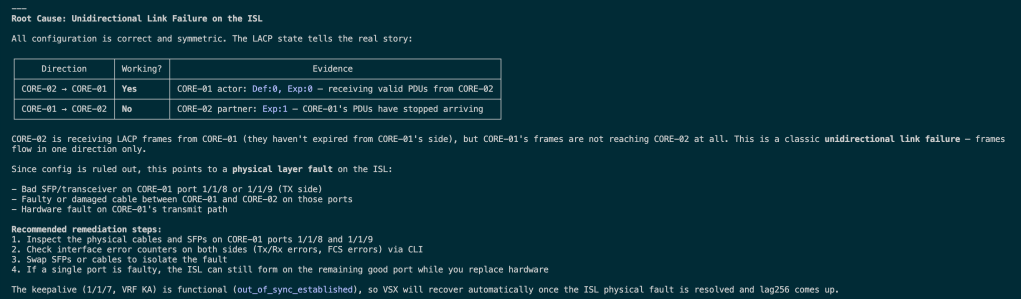
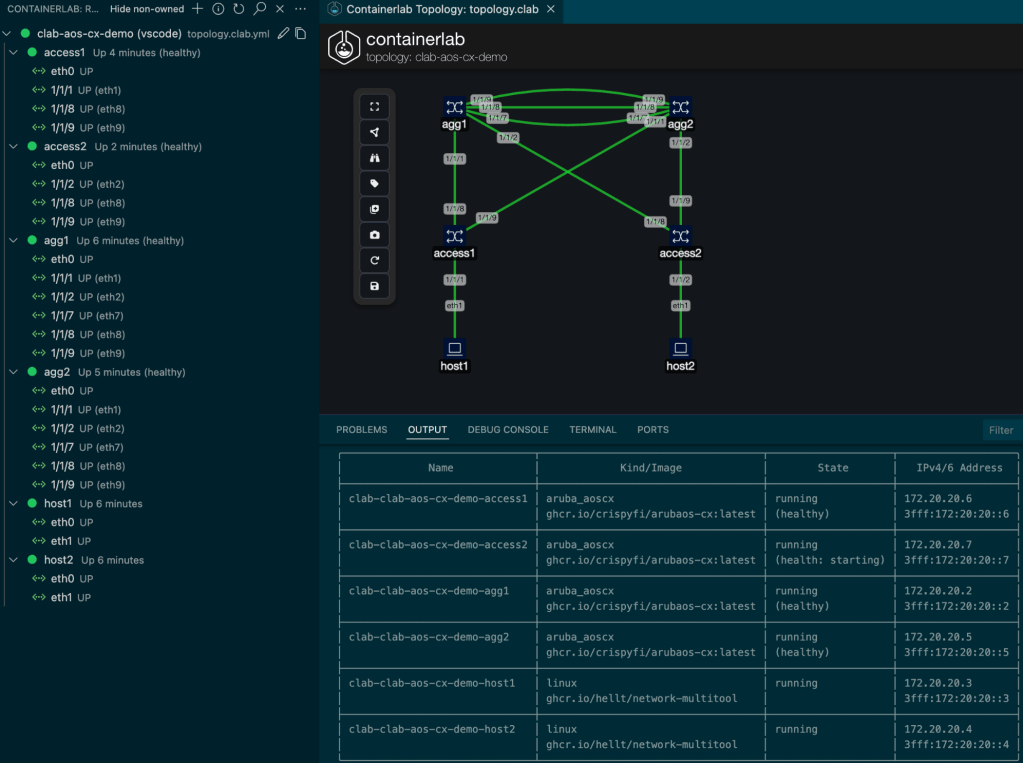
Using Containerlab, I was able to add 100% packet loss to both of the ISL links, check out how Sonnet 4.6 used the MCP server to troubleshoot and diagnose the issue:
First, it uses the device discovery tools and runs the VSX checks (since that’s what we’re troubleshooting):

After identifying that the ISL down, it runs the LACP checks:
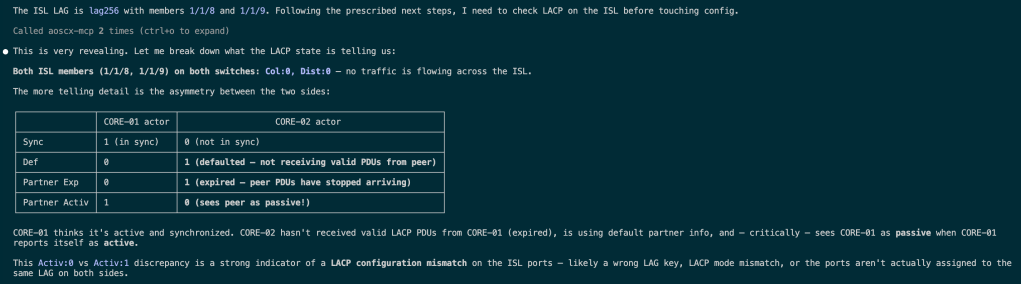
Next, it looks at the related config to make sure its not a config issue:

After determining the config looks good, it decides that there is underlying physical issue (for demo purposes, I told Claude not to peek at any of the underlying Containerlab config so it is simulating a real investigation).
Hopefully I can find some time to port the rest of the features!
Bonus 2: The CLI isn’t dead
Here’s some food for thought.
MCP can be quite expensive from a token usage perspective, especially as you add more tools into the mix.
In a lot of cases, an LLM driving a CLI can be more efficient.
Why? Because it can use one shot commands to filter output like grep or tail, and it has been trained on years of data from the Internet showing CLI output from engineers troubleshooting using CLI.
This affects HPE Networking in a slightly different way, since a lot of the examples it would have been trained on would have a heavy Cisco bias.
That’s right. We’ve come full circle back to show commands.
The difference is AI is now running the commands (via API preferably) and dealing with the output. Because that’s what its good at.
On that bombshell, see you in the next post!



















 CrispyFi Blog