There’s no such thing as a free lab?
I was working on a project where I wanted to prototype a VXLAN deployment, and was about to revive a GCP VM mentioned in my previous blog post.
This time, I also wanted to see if I could use the VS Code Extension on my local machine to interact with the lab.
Familiarising myself with the documentation again, I noticed a comment from the Containerlab team mentioning Codespaces:

Intrigued, I explored Containerlab’s documentation on Codespaces and looked at the official GitHub Codespaces page.
Codespaces are cloud-hosted development environments that can be quickly deployed using Docker Development containers.
On GitHub’s free tier, you have access 120 CPU core-hours on one of their 4 vCPU machines, which is 30 hours of free lab time – perfect for occasional use.
The Containerlab team have published a Development container image that includes almost everything you need to spin up a lab in Codespaces…
I can hardly contain myself!
If you want to run the HPE Aruba Networking CX Switch Simulator in Containerlab, you need to bring your own Docker image.
This requires downloading the OVA file from HPE Networking Support, and using vrnetlab to package it inside a Docker container.
Accessing the image from Codespaces also requires the image to be hosted in a Container Registry.
Since I run an ARM-based mac, I can’t make x86 Docker images on my machine, so I would have to do this from a VM hosted somewhere else.
This is where ljarasius suggested I use a GitHub Action to download the OVA, make the Docker container image, and publish to a private GitHub Container Registry.
Now everything could be done from in CodeSpaces (once obtaining the download link of course).
All systems go
- GitHub account – check
- New repo – check
- Dev container image – check
- AOS-CX container image – check
- VS Code extension – check
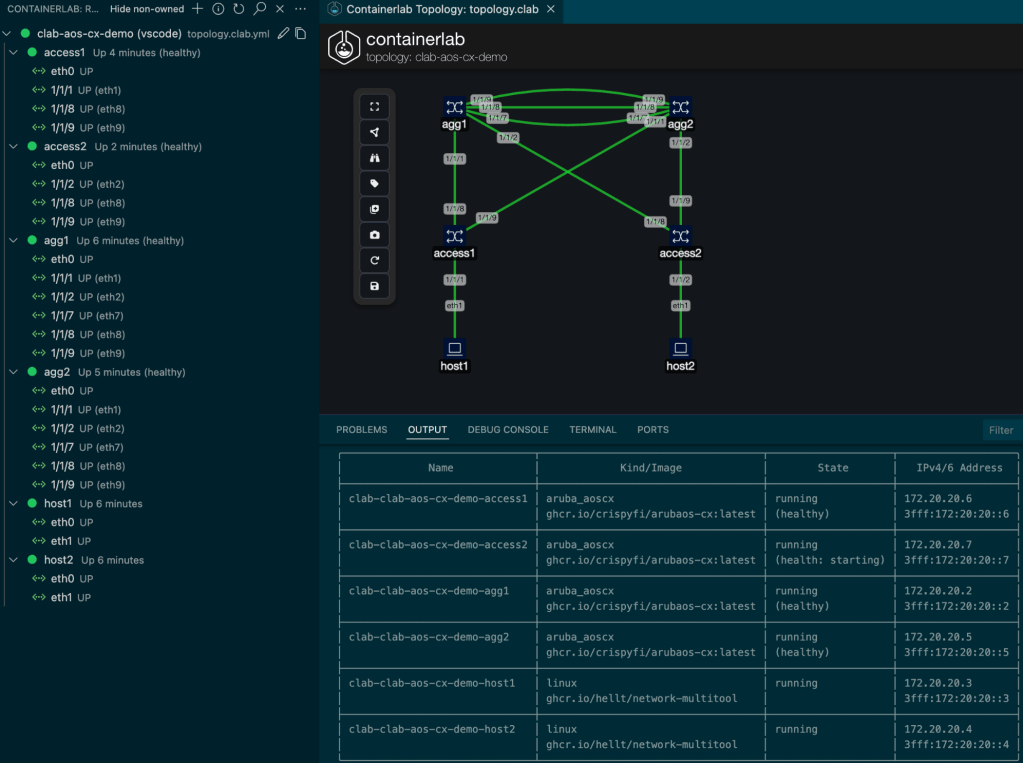
After creating a simple topology.yml file in the GitHub, I was able to get a fully functional lab working from VS Code running on my MacBook – and this is what it looked like.
I created a GitHub repository with a full set of instructions that you can fork and use to get your own lab up and running quickly.
https://github.com/crispyfi/clab-aos-cx-demo
[stderr] 03:31:42 INFO Containerlab started version=0.68.0
[stderr] 03:31:42 INFO Parsing & checking topology file=topology.clab.yml
[stderr] 03:31:42 INFO Creating docker network name=clab IPv4 subnet=172.20.20.0/24 IPv6 subnet=3fff:172:20:20::/64 MTU=1500
[stderr] 03:31:42 WARN iptables check error: exit status 111. Output:
[stderr] 03:31:42 WARN iptables check error: exit status 111. Output:
[stderr] 03:31:42 WARN iptables check error: exit status 111. Output:
[stderr] 03:31:42 WARN iptables check error: exit status 111. Output:
[stderr] 03:31:42 INFO Pulling ghcr.io/crispyfi/arubaos-cx:latest Docker image
[stderr] 03:32:31 INFO Done pulling ghcr.io/crispyfi/arubaos-cx:latest
[stderr] 03:32:31 INFO Pulling ghcr.io/hellt/network-multitool:latest Docker image
[stderr] 03:32:42 INFO Done pulling ghcr.io/hellt/network-multitool:latest
[stderr] 03:32:42 INFO Creating lab directory path=/workspaces/clab-aos-cx/clab-clab-aos-cx-demo
[stderr] 03:32:42 INFO Creating container name=agg1
[stderr] 03:32:42 INFO Creating container name=host1
[stderr] 03:32:42 INFO Creating container name=host2
[stderr] 03:34:13 INFO node "agg1" turned healthy, continuing
[stderr] 03:34:13 INFO Creating container name=agg2
[stderr] 03:34:13 INFO Created link: agg1:eth9 (1/1/9) ▪┄┄▪ agg2:eth9 (1/1/9)
[stderr] 03:34:13 INFO Created link: agg1:eth8 (1/1/8) ▪┄┄▪ agg2:eth8 (1/1/8)
[stderr] 03:34:13 INFO Created link: agg1:eth7 (1/1/7) ▪┄┄▪ agg2:eth7 (1/1/7)
[stderr] 03:36:45 INFO node "agg2" turned healthy, continuing
[stderr] 03:36:45 INFO Creating container name=access1
[stderr] 03:36:45 INFO Created link: agg1:eth1 (1/1/1) ▪┄┄▪ access1:eth8 (1/1/8)
[stderr] 03:36:45 INFO Created link: agg2:eth1 (1/1/1) ▪┄┄▪ access1:eth9 (1/1/9)
[stderr] 03:36:45 INFO Created link: access1:eth1 (1/1/1) ▪┄┄▪ host1:eth1
[stderr] 03:41:17 INFO node "access1" turned healthy, continuing
[stderr] 03:41:17 INFO Creating container name=access2
[stderr] 03:41:18 INFO Created link: agg1:eth2 (1/1/2) ▪┄┄▪ access2:eth8 (1/1/8)
[stderr] 03:41:18 INFO Created link: agg2:eth2 (1/1/2) ▪┄┄▪ access2:eth9 (1/1/9)
[stderr] 03:41:18 INFO Created link: access2:eth2 (1/1/2) ▪┄┄▪ host2:eth1
[stderr] 03:41:18 ERRO Failed to execute command command="bash /host2.sh" node=host2 rc=127 stdout=""
[stderr] stderr=
[stderr] │ bash: /host2.sh: No such file or directory
[stderr] 03:41:18 ERRO Failed to execute command command="bash /host1.sh" node=host1 rc=2 stdout=""
[stderr] stderr=
[stderr] │ RTNETLINK answers: File exists
[stderr] 03:41:18 INFO Adding host entries path=/etc/hosts
[stderr] 03:41:18 INFO Adding SSH config for nodes path=/etc/ssh/ssh_config.d/clab-clab-aos-cx-demo.conf
╭───────────────────────────────┬────────────────────────────────────┬────────────────────┬───────────────────╮
│              Name             │             Kind/Image             │        State       │   IPv4/6 Address  │
├───────────────────────────────┼────────────────────────────────────┼────────────────────┼───────────────────┤
│ clab-clab-aos-cx-demo-access1 │ aruba_aoscx                        │ running            │ 172.20.20.6       │
│                               │ ghcr.io/crispyfi/arubaos-cx:latest │ (healthy)          │ 3fff:172:20:20::6 │
├───────────────────────────────┼────────────────────────────────────┼────────────────────┼───────────────────┤
│ clab-clab-aos-cx-demo-access2 │ aruba_aoscx                        │ running            │ 172.20.20.7       │
│                               │ ghcr.io/crispyfi/arubaos-cx:latest │ (health: starting) │ 3fff:172:20:20::7 │
├───────────────────────────────┼────────────────────────────────────┼────────────────────┼───────────────────┤
│ clab-clab-aos-cx-demo-agg1    │ aruba_aoscx                        │ running            │ 172.20.20.3       │
│                               │ ghcr.io/crispyfi/arubaos-cx:latest │ (healthy)          │ 3fff:172:20:20::3 │
├───────────────────────────────┼────────────────────────────────────┼────────────────────┼───────────────────┤
│ clab-clab-aos-cx-demo-agg2    │ aruba_aoscx                        │ running            │ 172.20.20.5       │
│                               │ ghcr.io/crispyfi/arubaos-cx:latest │ (healthy)          │ 3fff:172:20:20::5 │
├───────────────────────────────┼────────────────────────────────────┼────────────────────┼───────────────────┤
│ clab-clab-aos-cx-demo-host1   │ linux                              │ running            │ 172.20.20.4       │
│                               │ ghcr.io/hellt/network-multitool    │                    │ 3fff:172:20:20::4 │
├───────────────────────────────┼────────────────────────────────────┼────────────────────┼───────────────────┤
│ clab-clab-aos-cx-demo-host2   │ linux                              │ running            │ 172.20.20.2       │
│                               │ ghcr.io/hellt/network-multitool    │                    │ 3fff:172:20:20::2 │
╰───────────────────────────────┴────────────────────────────────────┴────────────────────┴───────────────────╯
Four AOS-CX containers can get a little sluggish, so you can always run them on a bigger machine, or upgrade to a GitHub Pro account for more Codespaces core-hours.
Git with the program
Not only is this a simple, quick and cost-effective way to spin up a lab, it forces you to learn version control with Git and how to use Git with VS Code.
Once you’re comfortable with how everything hangs together, you can do everything straight from VS Code – no browser required.
What’s next
Shortly after getting my lab up and running in Codespaces, I came across Antimony which I can’t wait to try!
 CrispyFi Blog