A real-world evaluation by an everyday commuter.
A significant investment
“We’ve always done things this way”, is the most dangerous phrase in language, or so the quote goes.
I shelled out close to $10,000 (AUD) on Ekahau hardware and software a few years ago, and my current employer did the same, both before the release of the 6GHz capable Sidekick 2.
Needless to say, these were significant investments in a particular toolset, and so was the time spent building experience and workflows using that toolset.
Our customers have also grown accustomed to seeing designs presented in a certain way.

New kid on the block
Enter Hamina. Having recently released their Onsite survey software and matching hardware, they now have a complete solution that could be a viable alternative for us.
From a pure cost perspective, it is a no-brainer. We can easily pay for multiple years of licensing and the 6 GHz capable Oscium Nomad for less than the cost of a new Sidekick 2.
The bigger question is: can it do what we need it to?
Taking it for a spin
After kicking the tyres with the beta version almost 2 years ago, I had an opportunity to use Hamina Planner to create a predictive design for one of our customers.
This was an ideal opportunity to do an internal evaluation and try out all of the new features that have been added.
When you have used any vendor’s technology for a decent length of time, it is easy to see everything through the lens of their way of doing things.
I’ll be the first to admit you can get comfortable with what is familiar, but it’s important to stay as objective as possible during any evaluation.
Rather than looking for feature-by-feature parity, there may be a better way to achieve the same outcome or a completely different philosophy for that aspect of a design.
R is for Requirements
After remembering what was drilled into me in my early consulting days, I started with our requirements.
Here is a list of what would end up as deliverables in one of our typical predictive design reports (funnily enough, these are also all based on requirements!):
- List the requirements our design was aiming to meet:
- In-scope vs out-of-scope areas
- Thresholds for each chart shown
- Prove that our design met the requirements:
- Primary and secondary signal strength
- SNR
- Data rates
- Co-channel interference
- Show how our design would meet those requirements:
- AP name & placement
- AP model
- AP radio configuration (status, transmit power, channel width)
- Mounting information & antenna direction
Go with the workflow
With that in mind, I set to work on a predictive design as I usually would: Importing and scaling a floor plan, defining in-scope vs out-of-scope areas, setting up coverage and capacity requirements, drawing walls and attenuation areas and finally, placing access points.
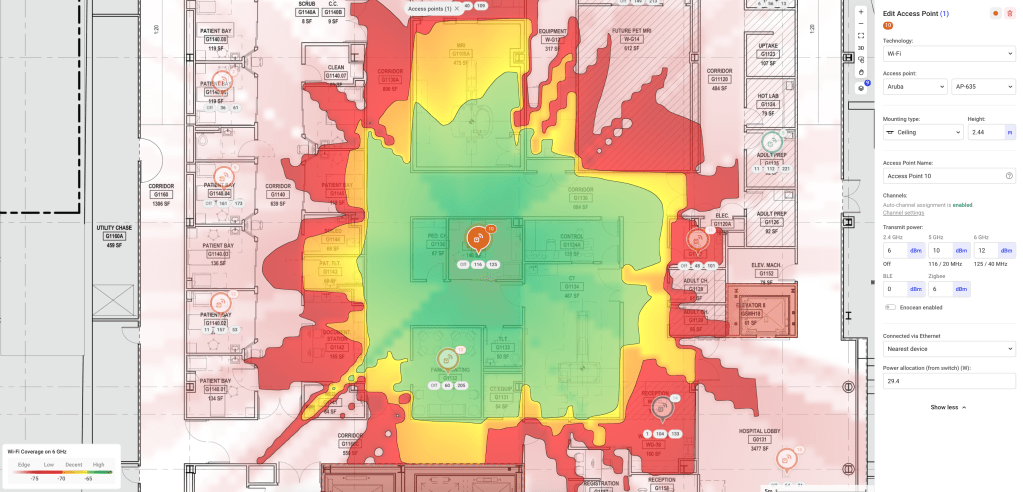
The user experience in Planner is lightning fast and I found myself getting less frustrated drawing zones and walls (it often used to take me a couple of attempts to define an irregularly shaped entire building area in AI Pro).
I also love the continuous approach to channel planning, as opposed to re-running it periodically.
It took me a little while to find a few settings, but overall the interface is very intuitive.
Coming to the Party
Before publishing this blog, I shared it with Grant Shelley from Hamina, who heads up Technical Operations for APAC. We exchanged a few emails and to cut a long story short I ended up on a Zoom call with the team in Finland where we had a great conversation about some of my feedback, the philosophy behind the technology and some exciting features that are in development.
It is exactly this sort of community engagement that makes working with the Hamina tools so awesome. I was blown away to even have a conversation about my feedback but never dreamed I’d be talking to the Founder / CEO and Technical director about it over Zoom.
Jussi was even kind enough to offer this screenshot as proof that it didn’t make all of this up!

Home comforts
I take my hat off to the Hamina product development team and the developers themselves for the pace and quality of new features released.
There are a few minor improvements that I would love to see in future updates, and I’m pleased to say that nearly all of them are already in development or under consideration in their feature request portal.
A couple of these were:
- Being able to crop floor plan images (I’ve been told this feature is nearly ready!)
- Being able to change the colour for scope zones
Reporting-as-code
On the call with Hamina, we talked about report customisation, and how it might work with something like markdown and variables to customise the presentation of data that is already in the tool.
That way, we could include all of our usual company fluff, customer or project-specific info, and dynamically reference design and configuration parameters without having to re-export a report, and scroll through and edit an external document after making a minor change.
On the subject of reporting, I was given permission to share a sneak preview of what could be the new AP Install Sheet! This will go a long way towards getting APs deployed correctly the first time.

Airtime is of the essence
Another thing we talked about on the call was airtime-based capacity planning.
While there is already client-count-based capacity modelling, it isn’t yet possible to define a list of their bandwidth requirements, and some key client types are missing (e.g. laptop running Windows).
The team assured me that having a Windows client in Planner was high on their to-do list and would be in there very soon.
In most office designs I’ve done recently, Microsoft Teams has been the most critical business application that relies on the wireless network (or at least the easiest for a customer to define).
Understanding the required number of AP radios to achieve the total aggregate throughput for a mix of clients using Teams video according to the bandwidth requirements from Microsoft would be very useful indeed.
While this feature is useful in office-type designs, many engineers are happy with a more rudimentary client count per AP capacity metric. I’m sure this has something to do with the difficulty in nailing down specific device and throughput requirements.
Perhaps total-system throughput or per-AP uplink capacity would be more useful, especially in large public venue designs?
Will it blend?
So, can Hamina Planner replace Ekahau AI Pro as my daily driver? My vote is a resounding yes, with a few downstream changes required.
One of the biggest differences is the way data is presented. Our current workflow involves exporting a .docx file and merging it into one of our standard document templates which includes antenna patterns, key specifications, project background etc.
In my opinion, one of Planner’s killer features (there are many!) is the ability to publish an interactive version of the report that customers can explore.
So perhaps for us, we would include a smaller number of screenshots in our standard report template as a teaser for the full interactive design, accessible via a password-protected link.
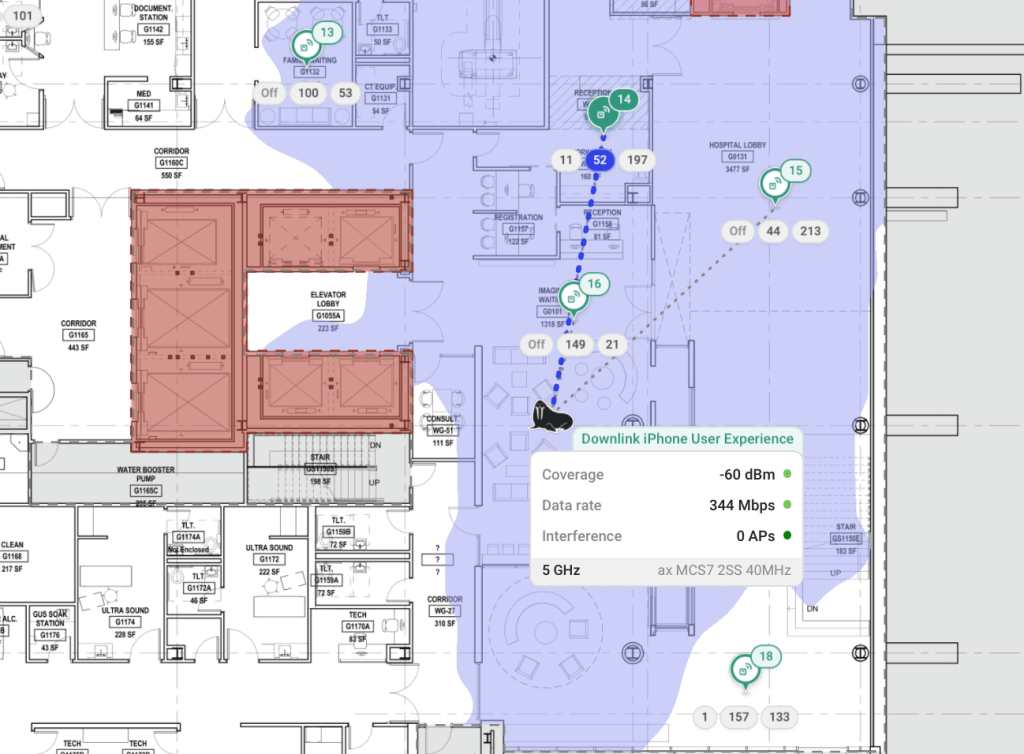
Once customers realise they can move a walrus stick figure man around their office to see how clients might roam (another killer feature) I’m sure they won’t miss their old report full of almost identical-looking images.
Let’s be honest, that is way more fun than reading a PDF full of green floor plans. Who even makes it past the first 10 pages anyway?
Up next
In an upcoming post, I’ll take a similar look at Hamina Onsite.
In the meantime, check out Hamina planner for yourself – you can even do a predictive design for your house with the free version!
 CrispyFi Blog